What a faceless video podcast is
A faceless video podcast is a show that publishes as video, on YouTube or Spotify, without the hosts ever appearing on camera. The audio is a normal podcast: real people talking. What the viewer sees is everything else: footage and images that match the topic, captions, titles and chapter cards.
You might want one because:
- You do not want to be recognised, for work, family or safety reasons
- Your guests join by phone or over a call, and the webcam footage looks poor
- You have no time or budget for cameras, lights and a video editor
- The story is the point, not the people telling it (true crime, history, science, business)
The good news: a faceless show is no longer a second-best choice. It is a format viewers already know from documentary and explainer channels.
Why video matters even if you never show up in it
Podcast listening has moved to video. YouTube passed one billion monthly podcast viewers in 2025, and it is the platform new listeners use most to find a show (Podbean). Castos reports that 72% of new podcast listeners found their show through video first, then moved to audio (Castos).
Spotify is pushing the same way. Since 2025 its Partner Program has paid video podcast creators based on how their videos perform.
If your show is audio only, you are invisible in the places new listeners look. A faceless video podcast gets you in without a camera.
The one rule: your voice is the human part
In July 2025 YouTube tightened its monetisation rules against what it calls "inauthentic" content: videos that are mass-produced, repetitive, or have almost no human input. Channels that pair a robot voice with a slideshow and pump out the same video again and again are the target.
A faceless podcast sits on the right side of that line, as long as you keep two things true:
- Real people do the talking. Your conversation, your opinions and your guests are the original work. AI is only building the pictures around it.
- Every episode is different. The visuals follow what is being said in that episode, not a template stamped onto every upload.
One more rule: YouTube asks you to disclose realistic content made with AI (for example, a photo-real scene that never happened) using the altered or synthetic content setting when you upload. Stylised images and licensed stock footage do not need it. When in doubt, tick the box. It does not hurt reach.
Five faceless formats, from weakest to strongest
| Format | What viewers see | How well it holds viewers |
|---|---|---|
| Still cover art | Your podcast artwork for the whole episode | Poor. Most people leave in the first 90 seconds |
| Audiogram | Cover art plus a moving sound wave | Poor for full episodes. Fine for 30 second teasers |
| Slides or screen share | Charts, notes or a screen, changed by hand | Good for teaching shows. Slow to make |
| Animated or illustrated | Custom art that follows the story | Strong, but expensive per episode |
| Directed b-roll | Footage and images matched to each topic, with captions | Strong, and fast when AI does the matching |
The last row is what documentary channels do: the narration carries the story and the pictures change every few seconds to match it. That used to take an editor days. An AI b-roll generator now does the matching for you.
How to start a faceless video podcast, step by step
Step 1: Pick a show that works without faces
The formats that work best are the ones where the listener cares about the topic more than the host's expression:
- Narrative shows: true crime, history, mysteries, biographies
- Explainers: science, money, tech, health, how things work
- Interview shows: where the guest's story is the draw
- Commentary: news, culture, sports analysis
A test worth doing: could you describe 30 episodes right now, each with a clear topic someone might search for? If yes, the show has legs.
Step 2: Record audio that deserves to be watched
With no faces on screen, the voice does all the work. Viewers forgive plain visuals. They do not forgive bad sound.
- Use a dynamic microphone, not a laptop mic. A good one costs under $100.
- Record in a small room with soft things in it (a wardrobe full of clothes is a classic).
- With remote guests, record each person on their own track, then mix.
- Cut the long pauses and false starts, but keep the conversation natural.
Step 3: Set up your look once
Decide your colours, your logo and your cover art before episode one, then use them on every video. It is what makes a faceless channel look like a real show and not a random upload. In Podeo.ai this is the podcast profile: you set colours, logo and a library of your own images once, and every generated video follows them.
Step 4: Turn the audio into a video
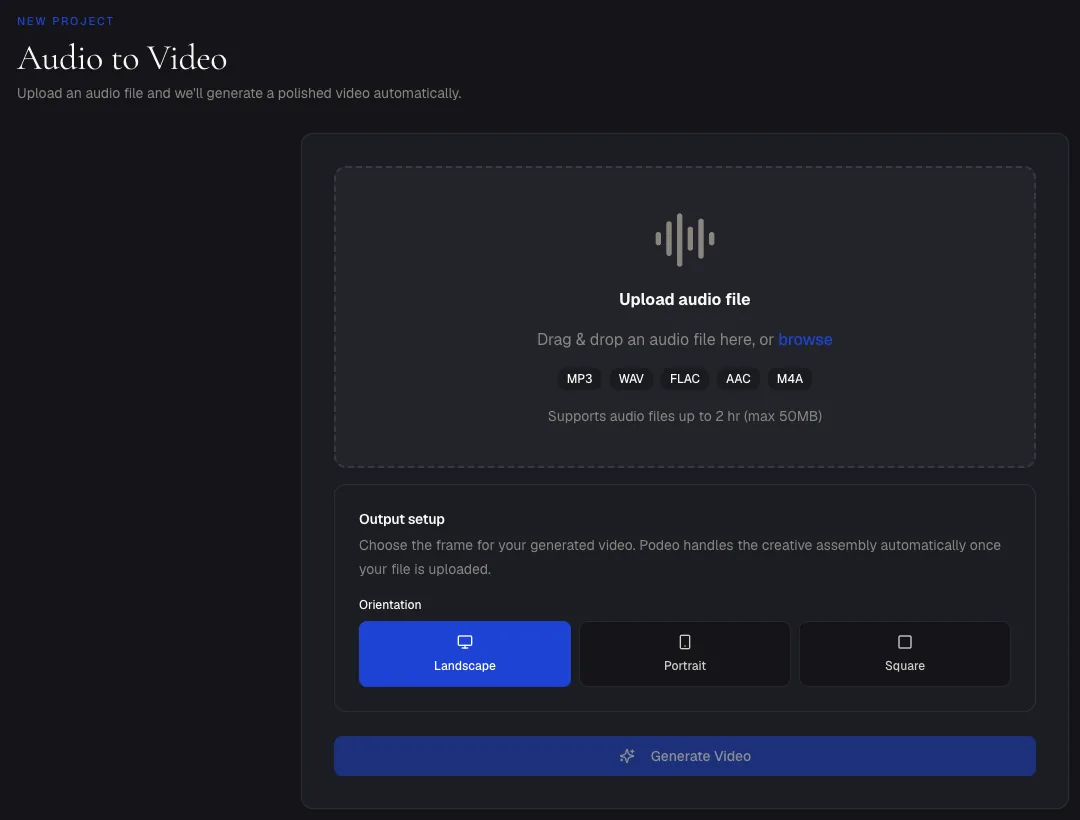
Upload the finished episode in Podeo.ai audio to video. It takes MP3, WAV, FLAC, AAC and M4A files. Choose landscape for YouTube, or portrait and square for Shorts, Reels and TikTok, then click Generate Video.
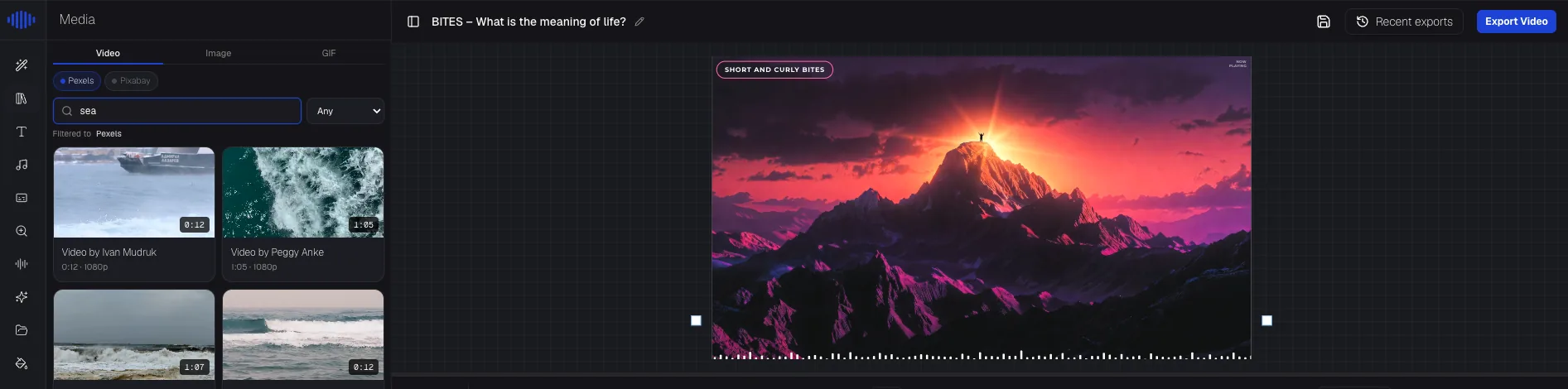
Podeo Director listens to the whole episode and works out its shape: the intro, each change of topic, the ending. Then it places footage and images that match each part, adds captions timed to every word, and marks the chapters. When nothing in the stock library fits what is being said, it generates an image instead.
Step 5: Fix anything by typing it
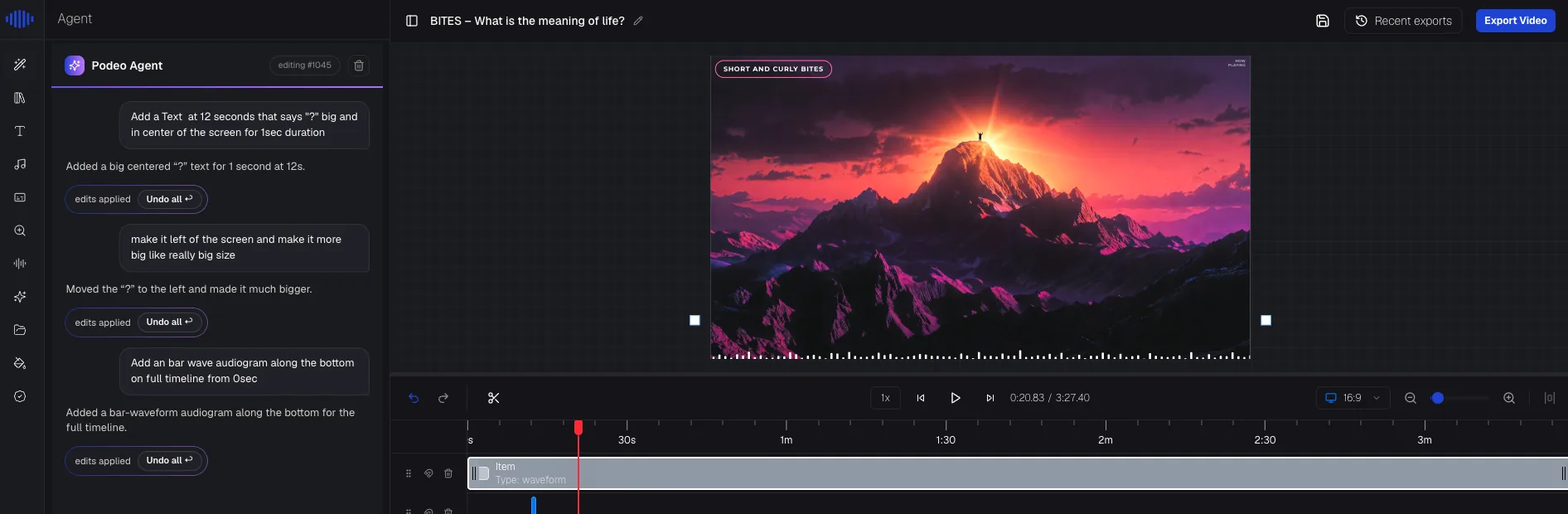
No timeline skills needed. Tell the editor what you want in plain words and it makes the change. "Add a sound wave along the bottom for the whole episode." "Make that title bigger and move it left." This is editing by chat, and every change can be undone in one click.
Step 6: Publish, then publish again
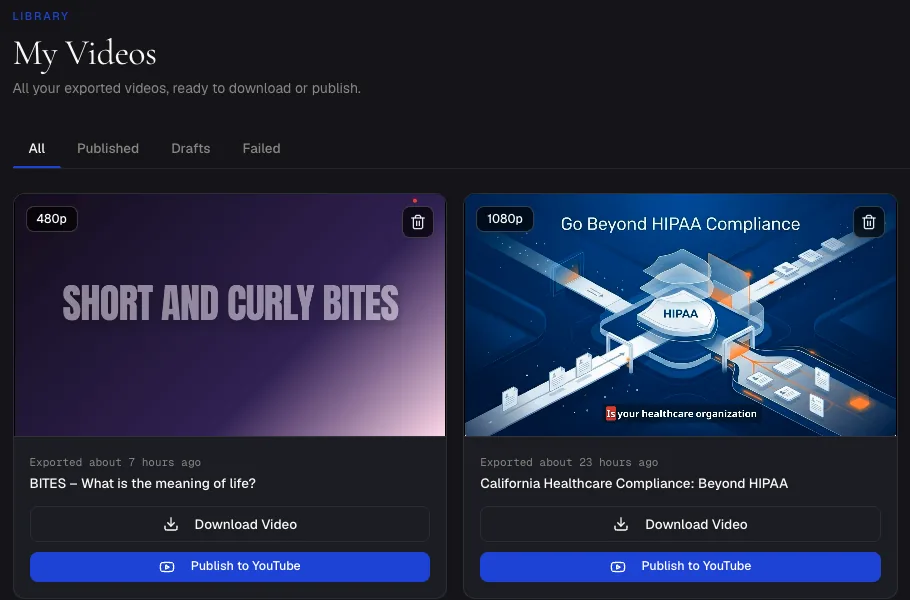
Export the video, or send it straight to YouTube with a title, description, chapters and thumbnail written from the episode. Our guide on how to put a podcast on YouTube covers the channel settings that help it get found.
Then reuse it. A portrait version of your strongest two minutes makes a Short. The same episode goes to Spotify as a video podcast. One recording, three places to be found.
Step 7: Keep a schedule you can hold
Faceless channels grow on consistency. Weekly beats daily-then-nothing. Because the video now takes about 20 minutes of waiting instead of a day of editing, the only real limit is how often you can record a good conversation.
Mistakes that sink faceless channels
- Using an AI voice instead of a real one. It is the fastest way to look like the mass-produced content YouTube demonetises, and listeners notice.
- The same visuals every episode. If your videos could be swapped with each other, YouTube and viewers treat them as filler.
- A cover image for 60 minutes. Covered above. It is the number one reason podcast channels stall.
- No captions. Many people watch with the sound off, and captions also tell YouTube what the episode is about.
- Titles that name the show, not the topic. Nobody searches for your show's name until they already love it.
Frequently asked questions
Can a faceless podcast make money on YouTube?
Yes. Faceless channels can join the YouTube Partner Program like any other channel. What YouTube will not pay for is mass-produced, repetitive content. A real conversation with visuals built for that episode is original work.
Do I need to use AI to make a faceless video podcast?
No. You can edit the visuals by hand in any video editor. AI simply cuts the job from a day to about 20 minutes, which is what makes a weekly schedule realistic for a small team.
Is it legal to use stock footage in my podcast videos?
Footage from libraries like Pexels and Pixabay is free to use under their licences, including on monetised videos. Avoid clips from films, TV or other creators' videos unless you have permission.
Can I turn my existing audio episodes into faceless videos?
Yes. That is the fastest way to start: your back catalogue is already recorded. Upload each episode's audio, or connect your podcast's RSS feed in the podcast to video tool and pick episodes from the list.
How much does it cost?
A microphone and your time. For the video, Podeo.ai has a free trial for episodes up to 5 minutes, and paid plans from $49 a month for episodes up to 30 minutes.
Start with the episode you already have
You do not need a new show to test this. Take your best existing episode, make a faceless video from it for free, and put it on YouTube. If people watch past the first two minutes, you have your format.